
 Support
 Login
Login

 English
 Svenska
 Norsk
Norsk Nederlands
Digital signage user experience: smarter, sleeker, and smoother – see what’s new in PLAYipp
News

Frida Westman
UX Lead at PLAYipp
Do you have any suggestions for improvement?
We’re happy to listen, don’t hesitate to reach out!
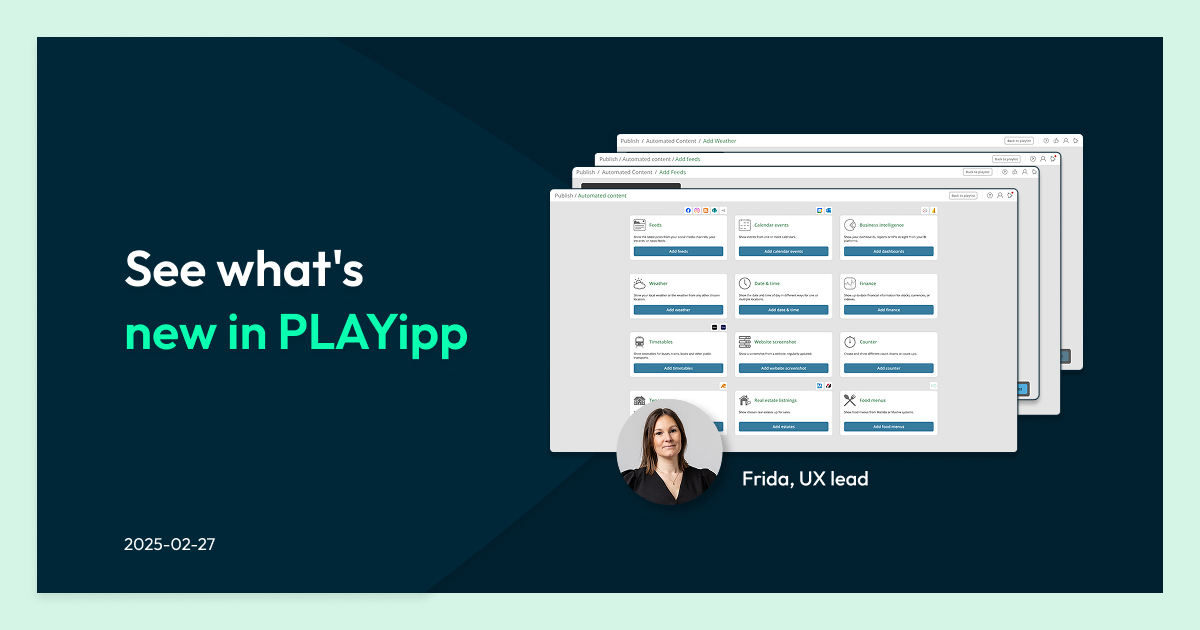
We are now starting to roll out a new, improved design for PLAYipp!
Our goal? To make it easier to connect integrations, faster to publish, and clearer to navigate—thanks to feedback from you, our users, and an expert review.
TL;DR summary
- PLAYipp rolled out an updated interface designed to improve the digital signage user experience.
- User experience in digital signage is primarily shaped by content relevance, visual clarity, and strategic placement.
- The new design simplifies navigation, makes integrations easier to configure, and speeds up content publishing.
- Clearer settings, helpful tooltips, and improved workflows help teams create and manage digital signage content more efficiently.
What we’ve updated
- Simplified settings – less scrolling, more overview.
- Made it easier to set up integrations – without having to start over.
- Added more guidance with tooltips and icons – so you can find what you need right away.
- Adapted the design to match your brand – less hassle, more wow!
Comment from PLAYipp and users
This is just the beginning of the improvements we are making to enhance the PLAYipp user experience. We are working hard to make it as easy as possible for you to communicate via digital screens.
“It’s so exciting to start rolling out the updated design for PLAYipp, which is both more visually appealing and easier for users. Especially since the first reactions from our users have been: ‘It’s much easier to find the settings now than before’ and ‘The new interface feels fresh.'”
Frida Westman and two PLAYipp users

The different categories under “Automatic Content” now include explanatory text and icons, making it easier to choose the right category from the start.

Tooltips help users get started when selecting a third-party system to display. All available content feeds are listed on the left.

A list of display types makes switching between them easy, with settings grouped underneath for a clearer overview.

From the Publish section, users can now add a new weather location without first navigating to the integrations interface.

When adding an RSS feed, a widget is now automatically created using your brand’s graphical profile.
Introduction to digital signage
Digital signage is transforming the way organizations communicate by using digital screens and displays to present scheduled content, information, and promotions. Unlike static signs, digital signage solutions offer a dynamic platform that can be updated in real time, making it easier to capture attention and engage audiences in retail stores, offices, and public spaces. As the global digital signage market continues to expand, more businesses are adopting digital signage to enhance customer engagement, streamline operations, and drive revenue growth. Whether used for in-store displays, wayfinding, or brand messaging, digital signage helps organizations deliver relevant content efficiently and create memorable experiences for their audiences.
Why digital signage user experience matters
Digital signage platforms are used by many different roles within an organization. Communication teams, marketing departments, IT teams, and operations managers often work together to publish and manage digital signage content.

If the platform is difficult to navigate, it slows down content creation and makes managing screens more complex than it should be.
A strong digital signage user experience helps organizations:
- publish digital signage content faster
- manage multiple screens across locations
- connect integrations with fewer steps
- ensure the right message reaches the right audience
- maintain consistency across digital displays
When a digital signage platform is user friendly, teams spend less time managing technology and more time communicating effectively.
A new interface designed around real user feedback
The updated PLAYipp interface is based on feedback from users combined with expert usability analysis.

Over time we noticed that some workflows required too many steps, while certain settings were harder to find than necessary. Our goal with the redesign was to simplify these processes and make the platform easier to navigate.
The result is a cleaner and more intuitive interface that improves the overall digital signage user experience.
The updated design focuses on three main improvements:
- simpler navigation
- faster publishing workflows
- clearer guidance when configuring integrations
These changes help reduce friction when managing digital signage systems and allow users to focus on creating engaging content for their screens.
Simplified settings and clearer navigation
One of the biggest improvements is the simplified settings structure.
Previously, some users had to scroll through multiple sections to locate the settings they needed. The updated interface groups related settings together and provides a clearer overview of the available options.
This makes it easier to:
- configure digital signage displays
- adjust screen settings
- manage integrations
- organize content for multiple screens
For organizations managing large digital signage networks, improved navigation saves valuable time and reduces the risk of configuration errors.
Easier integrations with third-party systems
Many organizations integrate their digital signage systems with external tools such as analytics platforms, social media feeds, or internal communication tools.
These integrations allow digital signage to display dynamic content such as:
- real-time dashboards
- news feeds
- weather updates
- internal announcements
The updated PLAYipp interface makes integrating digital signage with third-party systems easier than before.
Instead of restarting the setup process when adjusting integrations, users can now modify settings directly without losing their progress. This small change significantly improves the workflow when configuring new data sources or updating existing integrations.
Helpful tooltips and guidance
Another key improvement is the addition of contextual guidance throughout the platform.
Tooltips and icons now provide explanations directly inside the interface. These small hints help users understand what each setting does without needing to consult documentation.
This is especially helpful for new users who may be setting up digital signage content for the first time.
For example, when selecting an external system to display on a screen, the interface now shows:
- available content feeds
- explanations for each category
- quick access to relevant settings
This guidance makes the digital signage platform easier to learn and helps users get started faster.
A clearer workflow for publishing content
Publishing content should be fast and straightforward. After all, digital signage is often used to share time-sensitive information such as announcements, promotions, or operational updates.
The redesigned publishing workflow simplifies the process of creating and displaying digital signage content.
Users can now:
- access content feeds directly from the left navigation menu
- switch between display types more easily
- configure settings for each display in one place
These changes reduce unnecessary clicks and make content management more efficient.
For teams responsible for maintaining screens across multiple locations, this streamlined workflow can significantly improve operational efficiency.
Faster access to commonly used features
Another improvement focuses on frequently used features.
For example, users can now add a new weather location directly from the publishing interface without needing to navigate back to the integrations section.
Similarly, when adding an RSS feed, the system automatically generates a widget using the organization’s graphical profile.
These small improvements make the digital signage user experience smoother and help users work faster.
Supporting better digital signage content
Improving the platform interface is not just about usability. It also helps teams create more effective digital signage content.
When content creation tools are easier to use, teams are more likely to keep their screens updated and engaging.
Effective digital signage content often includes:
- company news and announcements
- customer-facing promotions
- social media feeds
- event information
- emergency alerts
A user friendly platform helps organizations keep their content fresh and relevant.
Interactive content and digital signage
Interactive digital signage takes customer engagement to the next level by allowing users to interact directly with digital screens. Through touchscreens, motion sensors, or augmented reality, interactive displays invite customers to browse products, access information, or participate in promotions—turning passive viewers into active participants. This approach not only makes digital signage content more memorable but also empowers the target audience to control their experience. By integrating interactive elements, businesses can create immersive digital experiences that boost engagement, encourage user participation, and ensure their messaging resonates with customers in real time.
Customization options in digital signage
One of the key benefits of digital signage is its flexibility and customization. Digital signage solutions allow businesses to tailor content for specific audiences, locations, and objectives—whether that means displaying dynamic content like videos and social media feeds or static images and text. The ability to customize layouts, designs, and user interfaces ensures that digital signage content aligns with brand identity and messaging. Additionally, integrating digital signage with mobile apps, loyalty programs, and other systems creates a seamless brand experience across multiple touchpoints. By leveraging these customization options, organizations can deliver effective digital signage content that captures attention, drives engagement, and supports business goals.
Energy efficiency in digital signage
Modern digital signage is designed with energy efficiency in mind, making it a more sustainable choice compared to traditional signage. Advances in LED and LCD technology have significantly reduced the power consumption of digital displays, while features like power-saving modes and automatic shutdown further minimize energy use. Many digital signage solutions are built to be eco-friendly, helping businesses lower their environmental impact without sacrificing the benefits of dynamic, engaging content. As sustainability becomes a higher priority, energy-efficient digital signage offers organizations a way to communicate effectively while supporting their green initiatives.
Measuring campaign effectiveness
To ensure digital signage campaigns deliver results, it’s essential to measure their effectiveness using real-time data and analytics. Digital signage solutions provide valuable insights into engagement metrics, sales performance, and customer feedback, allowing businesses to track key performance indicators and optimize their content strategy. By analyzing this data, organizations can identify what works, refine their messaging, and create more effective digital signage content that resonates with their audience. Leveraging a data-driven approach not only maximizes ROI but also helps businesses stay agile, adjusting campaigns on the fly to boost engagement and drive better outcomes.
Digital signage user experience and customer engagement
While the PLAYipp interface is designed primarily for administrators and content creators, the improvements ultimately benefit viewers as well.
When it is easier to create and manage content, screens become more dynamic and engaging. Digital signage enhances customer experience by providing personalized and dynamic content tailored to the needs and preferences of individual shoppers.
This helps organizations:
- capture attention in physical spaces
- enhance customer engagement
- improve the in-store experience
- communicate information clearly
- foster audience engagement and increased customer engagement through interactive experiences
Digital signage can boost engagement by up to 47% compared to static displays, and interactive digital signage transforms passive viewing into meaningful audience engagement.
Digital signage is most effective when the content is updated regularly and tailored to the target audience. A better user experience behind the scenes makes this possible.
Designing digital signage systems for the future
The global digital signage market continues to evolve as organizations invest in smarter and more interactive digital experiences.
Future trends in digital signage include:
- increased use of dynamic content
- more data driven signage strategies
- integration with mobile apps and loyalty programs
- real time data visualizations
- interactive digital signage displays

The evolution of digital signage in retail has mirrored broader technological advancements, particularly the increased use of data analytics and artificial intelligence. Artificial intelligence is now being used to personalize content and enhance customer engagement through dynamic, targeted displays, including interactive and immersive experiences. Personalization using AI-driven screens can provide tailored recommendations based on demographics or loyalty data. The global digital signage market is projected to reach USD 35.94 billion by 2026, underscoring growing demand and the long-term value of this segment.
As digital signage systems grow more advanced, usability becomes even more important.
Platforms need to remain intuitive even as new features and integrations are introduced.
That is why improving the digital signage user experience is an ongoing process.
Continuous improvements based on user feedback
The redesigned PLAYipp interface is just the beginning.
We will continue to refine the platform based on feedback from our users and insights from usability research.
Our goal is to ensure that managing digital signage remains simple, efficient, and enjoyable, whether you operate a handful of screens or a large global network.

As one of our designers and users recently shared:
“It’s much easier to find the settings now than before. The new interface feels fresh and easier to navigate.”
These improvements help teams focus on what matters most: delivering engaging digital signage experiences. If you want to learn more about how PLAYipp’s digital signage solutions can help your business, book a demo today.
Frequently asked questions about digital signage user experience
What is digital signage user experience?
Digital signage user experience refers to how easy it is for users to manage, configure, and publish content within a digital signage platform. A good user experience helps teams create and manage digital signage content efficiently.
Why is user experience important in digital signage platforms?
A user friendly platform reduces complexity and allows organizations to manage screens and publish content more quickly. This improves efficiency and ensures digital signage systems remain easy to maintain.
How does user experience affect digital signage content?
When content management tools are simple to use, teams can update screens more frequently and create more engaging content. This helps keep digital displays relevant and effective.
What features improve digital signage user experience?
Helpful features include simplified navigation, clear workflows, integration tools, and contextual guidance such as tooltips and icons. These features make it easier to configure screens and publish content.
How can organizations improve their digital signage systems?
Organizations can improve their digital signage systems by using platforms with intuitive interfaces, clear content management tools, and flexible integrations that support dynamic content.
See how others use PLAYipp

Securitas Norway achieves higher employee engagement with digital screens
Securitas Norway sought a dynamic, user-friendly communication solution capable of easily sharing information with all employees, regardless of their location.

Clear screen structure resolves Malmö university’s complex needs for information sharing
Malmö university has successfully deployed over 50 digital screens across its campuses. This technological solution has not only enhanced student communication but also streamlined the university’s internal information flow. The strategic and instructional screen setup has simplified content publication for…

The communicative transformation of Kulturkvarteret
Since the installation of the screens, Kulturkvarteret has observed a notable improvement in communicating information to visitors. “Our digital screens have transformed how we engage with our visitors”.
 Login
Login