
 Support
 Login
Login

 English
 Svenska
 Norsk
Norsk Nederlands
Did you know you can display Power BI reports directly on your digital screens?
Inspiration
TL;DR summary:
- Power BI digital signage lets you display Microsoft Power BI dashboards and reports securely on screens
- Real-time data becomes visible to employees in offices, stores, and production environments
- PLAYipp ensures secure integration without making URLs public or exposing sensitive data
Display Microsoft Power BI dashboards on your digital signage screens
Did you know you can display Power BI reports directly on your digital screens?
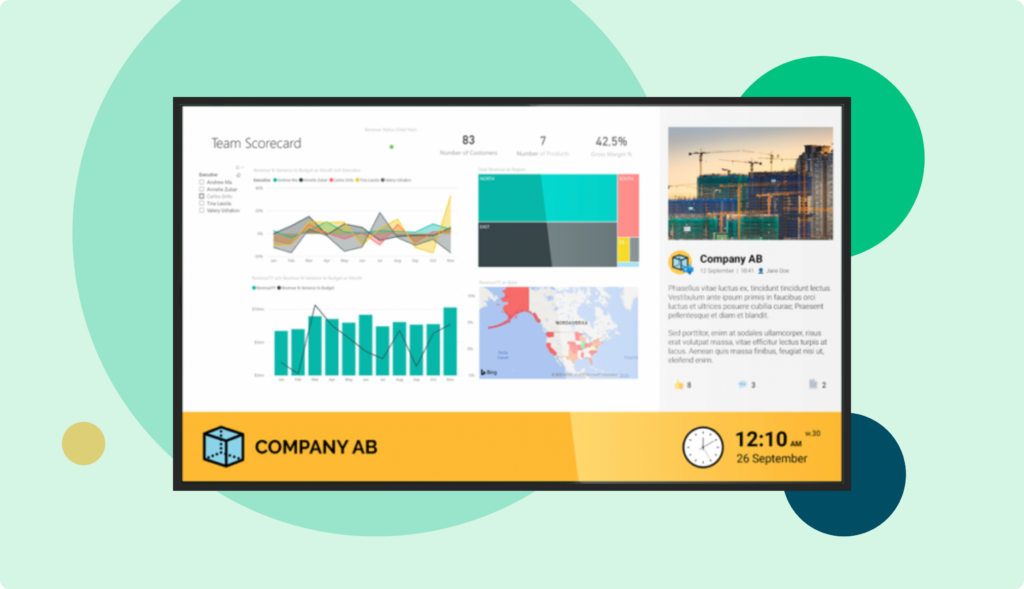
With our smart Power BI digital signage integration between PLAYipp and Microsoft Power BI, you can share dashboards, reports, and critical data across your entire organization on screen. Always up to date. Always in the right place.
“Power BI is one of the most versatile and widely used tools among PLAYipp’s users for visualizing information and data. With our latest update on Power BI, even more possibilities open up.”
Thomas Sundgren, CPO at PLAYipp
Did you also know that clear on-screen data can make a big difference in your day-to-day work?
By displaying Power BI reports on PLAYipp’s digital signage, everyone in the organization gets quick access to key information. It becomes easier to make decisions, track goals, and keep the whole team informed. Whether you’re in an office, a store, or on the production floor, visible data helps you get your message across.
Did you know Power BI can pull data from more than just Excel and databases?
This opens up tons of opportunities to visualize and share insights on your digital screens – even from tools you might not have considered. Here are some examples:
- Qlik Sense
- SharePoint Online List
- Microsoft Exchange Online
- Dynamics 365
- Google Analytics
- Salesforce Objects/Reports
- Adobe Analytics
- GitHub
- LinkedIn Sales Navigator
To get started, all you need is a Power BI account and a PLAYipp account.
Everything you need to know about the integration
Why display Power BI dashboards on digital signage?
Clear, visible data changes how people work.
By displaying Microsoft Power BI dashboards on digital signage screens, employees get quick access to key metrics and critical data without logging into a browser or Power BI workspace.

This makes it easier to:
- Track goals in real time
- Follow business performance
- Monitor KPIs across teams
- Keep everyone aligned with company priorities
Whether you work in an office, retail environment, healthcare clinic, or on a production floor, visible BI dashboards support faster decision-making and stronger alignment.
Power BI dashboards displayed on a TV screen or info screen securely ensure that data is not hidden inside personal devices or individual Microsoft accounts.
What makes Power BI digital signage powerful?
Microsoft Power BI is designed to connect and visualize data from multiple sources. With Power BI integration inside PLAYipp’s digital signage software, you can display Power BI content securely without relying on public URLs.
Power BI can pull data from:
- Excel and databases
- SharePoint Online Lists
- Microsoft Exchange Online
- Dynamics 365
- Google Analytics
- Salesforce objects and reports
- Adobe Analytics
- GitHub
- LinkedIn Sales Navigator
This means you can display dashboards that combine operational data, marketing performance, sales metrics, and productivity indicators on a single digital signage platform.
Instead of switching between systems, your BI dashboard becomes part of your everyday visual communication.
Secure integration without public URLs
Security matters when working with BI data.
Unlike solutions that require making URLs public, PLAYipp uses secure integration with Microsoft Power BI. This means:
- No making URLs public
- No exposing sensitive data
- No relying on public links
- Access is validated securely
Using short life encryption tokens and secure authentication methods, you can display Power BI dashboards on digital signage screens while keeping the content completely private.
This is especially important when displaying financial data, operational metrics, or other critical data across meeting rooms or shared environments.
How the Power BI integration works
To get started, you need:
- A Power BI Pro or Premium account
- A Microsoft account with proper access
- A PLAYipp account
From there, you can connect your Power BI workspace to PLAYipp’s digital signage software.
You can:
- Select report pages or specific tabs
- Display multiple pages in rotation
- Configure refresh interval and data refresh rate
- Embed signage content securely
- Control display period and screen settings

Power BI dashboards are displayed via a secure web application connection that validates access and ensures the web application loads successfully before showing content on screen.
The result is stable, real-time dashboards across your digital signage screens.
Display dynamic content across devices
With PLAYipp, you can display Power BI dashboards on:
- Meeting room screens
- TVs in offices
- Production area info screens
- Reception screens
Instead of static slides, your screen becomes a live dashboard.
Auto refresh ensures your dashboards stay current, and you can configure screen timeout or idle settings depending on your needs.
If a meeting starts in a meeting room, signage mode can automatically pause the dashboard display.
Why use PLAYipp instead of browser-based display?
You could technically open a Power BI report in Google Chrome and load it in a browser window.
But that approach often:
- Requires manual login
- Depends on a browser staying active
- Risks exposing data
- Lacks centralized management
PLAYipp’s Power BI integration is designed specifically for digital signage. It eliminates the need for workarounds and ensures stable, secure display across devices.
Instead of relying on browser tabs, you manage everything from one digital signage software platform.
Keep your organization connected through data
Power BI dashboards are more than numbers. They tell a story.
When BI data is visible in shared spaces, teams feel connected to performance and goals. Real-time dashboards can increase transparency and improve accountability.
By embedding Power BI dashboards into your digital signage strategy, you:
- Make data accessible
- Support informed decision-making
- Encourage ownership of results
- Strengthen alignment across departments
Power BI digital signage turns passive screens into active performance tools.
Everything you need to know about the integration
Our Power BI digital signage integration is continuously updated to support the latest version of Microsoft Power BI and Teams environments.

As part of the Microsoft Partner Network and Microsoft publisher verified ecosystem, PLAYipp ensures reliable and secure integration with Microsoft services.
If you have suggestions for improvements in PLAYipp, we would love to hear from you.
Contact us and let’s talk.
Get started with Power BI digital signage
Do you want to display real-time dashboards securely across your organization?
With PLAYipp’s Power BI integration, you can embed signage content safely and make critical data visible where it matters most.
Contact us today to see how Power BI digital signage can strengthen your communication and performance management.
Frequently asked questions about Power BI digital signage
Power BI digital signage allows you to display Microsoft Power BI dashboards and reports on digital signage screens securely, without making URLs public.
Yes. A Power BI Pro or Premium account is required to connect your Power BI workspace and securely embed dashboards on digital signage.
Yes. PLAYipp uses secure integration methods including validated access and short life encryption tokens. Sensitive data is not exposed through public URLs.
Yes. You can select specific report pages, rotate multiple dashboards, and configure refresh intervals for real-time updates.
Yes. Power BI dashboards can be displayed on TVs, meeting room screens, and other digital signage devices connected to PLAYipp.

Thomas Sundgren
CPO at PLAYipp
Got suggestions for improvements in PLAYipp?
We’d love to hear them, don’t hesitate to reach out!
See how others use PLAYipp

How Meliva communicates smart and consistently across 37 healthcare centers
Meliva’s use of digital screens across 37 clinics has transformed how they communicate with patients and staff. With a clear visual identity and region-specific content, they’ve created a consistent and engaging experience in every waiting room.

See how CGI strengthens internal communication and engages the whole organisation
With digital screens now present at nearly 20 offices across Sweden, CGI has created a smart and modern way to keep over 3000 employees informed and engaged. By combining centrally controlled content with local updates, they’ve built a flexible setup…

Bringing goals to life and building culture with PLAYipp at Visma Amili
At Visma Amili, digital screens have become more than just a communication tool – they’re a way to bring strategy, goals and company culture into everyday life. By using PLAYipp across their offices, they’ve created a workplace where everyone is…
Do you want to know more about PLAYipp?
Contact us today, we are experts on digital signage and communication.
 Login
Login